Guide to Integrating OpenClaw MCP for Advanced AI Agent Optimization

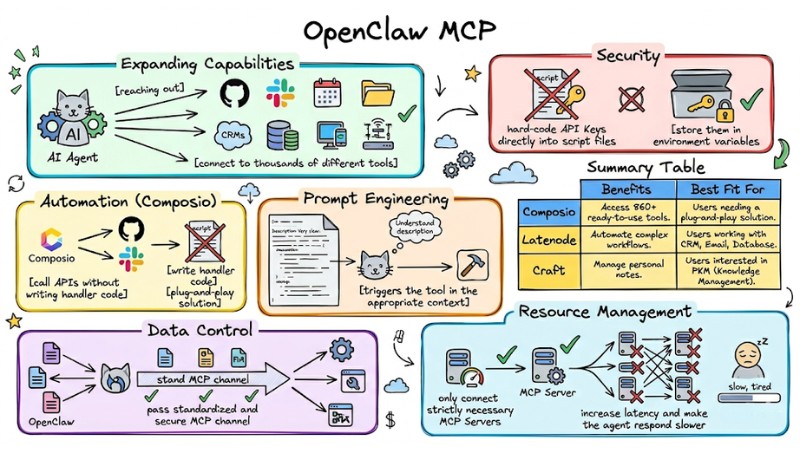
Connecting OpenClaw to external systems via the Model Context Protocol elevates your AI Agent beyond simple chat capabilities. In this article, I will guide you through the process of integrating OpenClaw MCP so you can control tools, manage data, and automate workflows directly from the OpenClaw environment.
Key Takeaways
- Understanding OpenClaw MCP: Learn about the open connection protocol that upgrades OpenClaw from a standard chatbot to a central orchestrator capable of executing real-world tasks across various systems.
- 3-Step MCP Integration Process: Master the steps from gathering information and configuring the
mcporter.jsonfile to restarting the Gateway to activate the connection. - Common MCP Integration Scenarios: Explore how to apply Composio, Latenode, and Craft to automate work ranging from note management to complex workflows.
- Tips for Effective OpenClaw MCP Usage: Equip yourself with a security-first mindset using environment variables, optimizing tool description prompts, and managing system resources.
- Troubleshooting Common Issues: Know how to quickly handle common errors such as authentication failures or interrupted connections via system log tools.
- OpenClaw MCP FAQ: Get answers to questions about feasibility, safety, and how to start integrating MCP even without a programming background.
What is MCP in OpenClaw and why do you need it?
The Model Context Protocol (MCP) is an open standard that allows AI systems to communicate with external data repositories and tools. In the OpenClaw ecosystem, MCP acts as a bridge, transforming OpenClaw from a mere chatbot into an orchestration framework capable of executing real-world tasks.
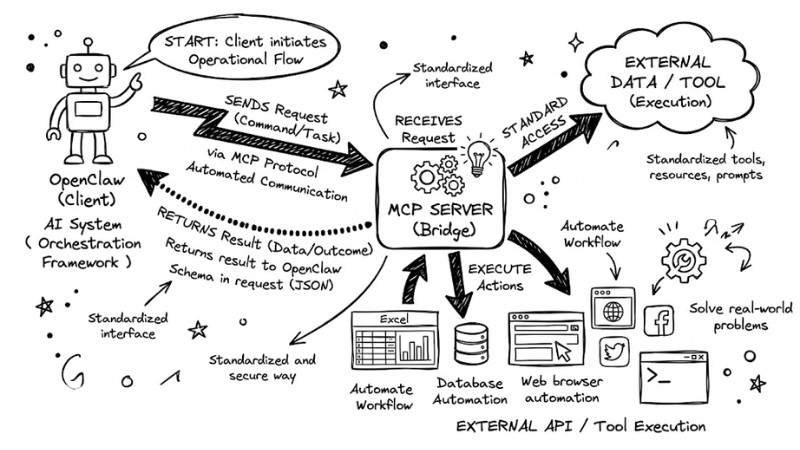
OpenClaw workflow diagram
Core Benefits:
- Expanding Capabilities: MCP helps OpenClaw connect to thousands of different tools like CRMs, calendars, file systems, or automation platforms. Consequently, a single AI Agent can "reach out" to almost any digital system you use instead of having to manually integrate each individual API.
- Data Control: All data exchanged between OpenClaw and external tools passes through a standardized and secure MCP channel, helping you minimize information leakage risks compared to allowing multiple applications to access data directly.
- Consistency: Using a single standard for all connections makes the configuration, monitoring, and maintenance process much simpler.
Standard 3-Step Process to Integrate Any MCP Server
Step 1: Gather Information
Before starting, ensure you have:
- Server URL: The access address of the MCP Server.
- API Key (if applicable): The authentication token from the service provider.
Step 2: Configure via mcporter.json
This is the "brain" that controls MCP connections. Navigate to the /home/username/.openclaw/workspace/config directory and edit the mcporter.json file:
{
  "mcpServers": {
    "your_server_name": {
      "command": "node",
      "args": ["path/to/your/server.js"],
      "env": {
        "API_KEY": "your_api_key_here"
      }
    }
  }
}
Note: Always check the JSON format to avoid syntax errors.
Step 3: Restart the Gateway
For changes to take effect, you need to restart the service via CLI:
cd /home/devloper_hs/openclaw && docker compose restart openclaw-gateway
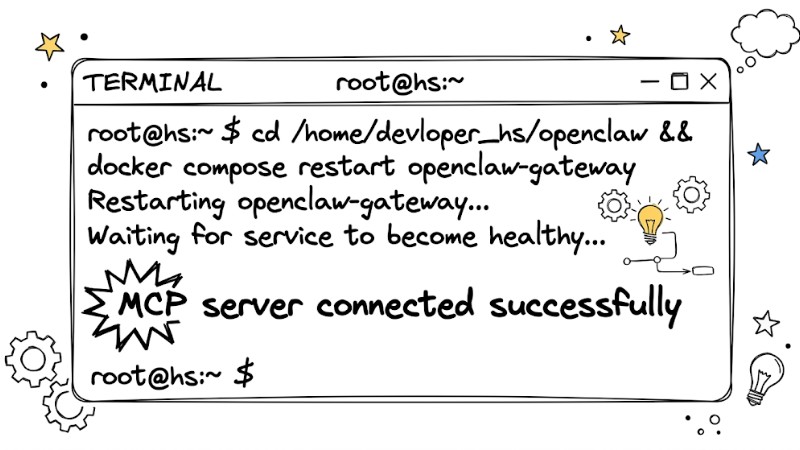
Terminal screenshot showing the message MCP server connected successfully
Common MCP Integration Scenarios with OpenClaw
- Automation (Composio): Used to call APIs for popular services like GitHub and Slack without writing handler code.
- Workflow (Latenode): Build business processes such as automatically sending report emails from data collected by the AI.
- Knowledge Management (Craft): Allows the AI to read, summarize, and directly edit documents within a personal workspace.
Summary Table of Common MCP Integration Scenarios with OpenClaw:
| Method | Benefits | Best Fit For |
|---|---|---|
| Composio | Access 860+ ready-to-use tools. | Users needing a "plug-and-play" solution. |
| Latenode | Automate complex workflows. | Users working with CRM, Email, Database. |
| Craft | Manage personal notes. | Users interested in PKM (Knowledge Management). |
Tips for Effective and Safe OpenClaw MCP Usage
To ensure OpenClaw MCP operates both effectively and safely, keep several important principles in mind during configuration and usage:
- Security: You should not hard-code API Keys directly into script files; instead, store them in environment variables to reduce the risk of exposing sensitive information.
- Prompt Engineering: When defining a tool in the MCP configuration, you need to write a very clear description so the AI understands the correct purpose and only triggers the tool in the appropriate context.
- Resource Management: You should only connect strictly necessary MCP Servers, as attaching too many servers simultaneously can increase latency and make the agent respond slower.
- Updates: Check for new versions of
mcporterto ensure compatibility with OpenClaw updates.
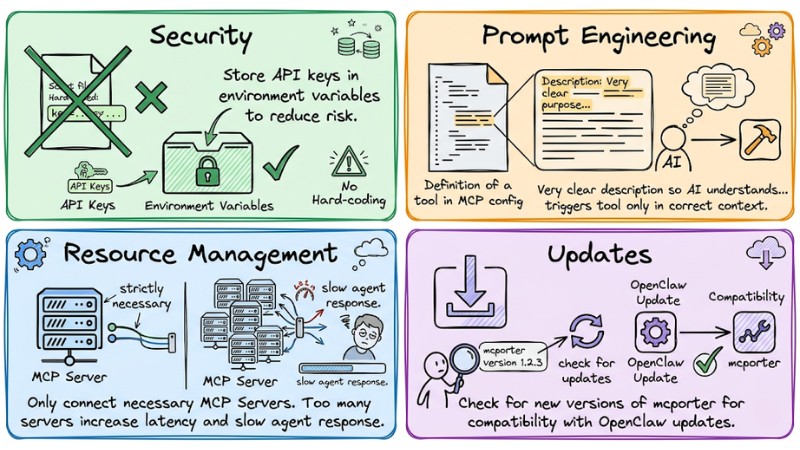
Tips for using OpenClaw MCP effectively and safely
Troubleshooting Common Setup Issues
| Error | Cause | Resolution |
|---|---|---|
| Tool not found | Incorrect tool name in JSON | Re-check the Tool Name in the configuration. |
| Authentication failed | Incorrect API Key | Re-check environment variables in mcporter.json. |
| Connection timeout | Server not responding | Run openclaw logs --mcp to view detailed error logs. |
If the connection is interrupted, try restarting the gateway container and check the logs with the command: openclaw logs --mcp to find traces of authentication errors or network configuration mismatches.
Frequently Asked Questions about OpenClaw MCP
What is OpenClaw MCP?
MCP (Model Context Protocol) is a protocol standard that allows AI Agents like OpenClaw to interact with external services and data. MCP helps OpenClaw become a powerful orchestrator connecting to hundreds of different tools and APIs.
Why integrate an MCP Server into OpenClaw?
Integrating an MCP Server significantly expands OpenClaw's capabilities. Your AI Agent can access and use data from other applications, perform complex tasks, and automate workflows without intensive programming.
How do I integrate an MCP Server into OpenClaw?
This process typically consists of 3 main steps. To integrate, you need to gather the URL and API key of the MCP Server, then configure them in the mcporter.json file and restart the OpenClaw Gateway via CLI.
Do I need to know how to program to use OpenClaw MCP?
Not necessarily. OpenClaw MCP is designed for hobbyists and automation enthusiasts. You need to follow configuration instructions, but deep programming experience is not required.
Where can I buy an API Key to connect to an MCP Server?
API Keys are usually provided by the MCP Server provider you wish to integrate. You need to create an account on that platform, then find the API settings or connection info section to obtain the key.
How do I fix authentication errors when connecting to an MCP Server?
Authentication errors are usually caused by an incorrect or missing API Key. Double-check the API Key you entered in mcporter.json to ensure it is accurate and valid.
Should I use the CLI or a Dashboard interface to configure the MCP Server?
The CLI is generally preferred for more secure configuration, especially when handling sensitive API Keys. However, some Dashboard interfaces may support MCP Server management, providing convenience for users.
Which types of MCP Servers does OpenClaw support?
OpenClaw is compatible with any MCP Server that adheres to the protocol standard. Popular examples include Composio, Latenode, and Craft MCP, allowing integration with many types of applications and services.
Do I need to know how to program to use MCP?
You are not strictly required to know how to program, as the MCP setup process primarily involves filling information into existing JSON configuration files. As long as you understand basic JSON "key-value" structures and can edit them according to instructions, you can connect an MCP Server to OpenClaw without writing new code.
Does integrating MCP slow down the AI?
Typically, adding one or a few MCP Servers will not significantly slow down the AI, as OpenClaw only queries the tool list when needed. Latency only becomes noticeable if you configure too many MCP Servers at once, forcing the agent to spend extra time listing and selecting the appropriate tool for each request.
What is the best way to secure an API Key?
The safest way is to store the API Key in a .env file or use a secret management mechanism from your OS/platform, then read them into mcporter via environment variables instead of writing them directly into the mcporter.json file. This approach makes it easy to rotate, revoke, or change keys without worrying about accidentally committing or sharing sensitive information.
Should I use a Dashboard or CLI for installation?
The CLI is the recommended choice because all configurations are saved as files, making them easy to back up, version control, and sync to other environments. Additionally, working via CLI limits accidental operations on a web interface and makes the process of managing API Keys and environment variables safer and more transparent.
Read more:
- OpenClaw Architecture: OS Solution for AI Agents
- OpenClaw Use Case: Effective Work Automation Methods
- What is Tool Calling? How to turn AI into a true action-taking assistant
Connecting MCP turns OpenClaw into a universal tool, allowing you to control your entire digital world from a single chat window. Start today by integrating your first tool through editing the mcporter.json file!