Self-hosted AI Agent: Build Your Own Maximum-Security AI Assistant

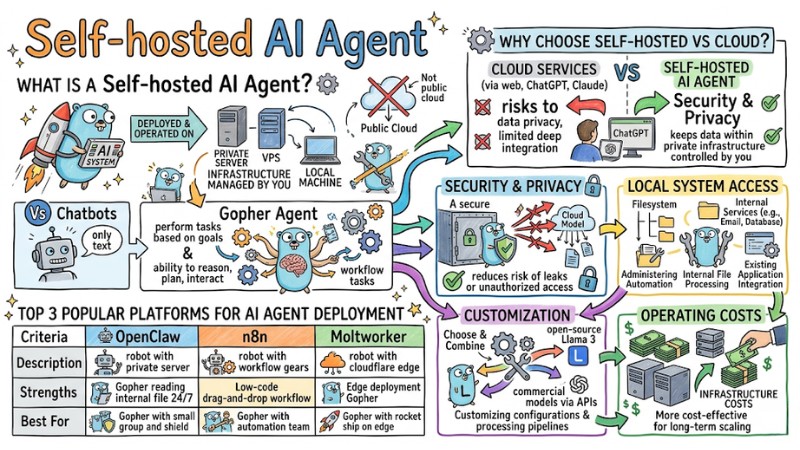
A Self-hosted AI Agent is an artificial intelligence system deployed on private infrastructure to optimize data control and user customization. This article introduces the concept of self-hosted AI Agents, reasons to use them over the Cloud, operational mechanics, popular platforms, deployment roadmaps, and security considerations.
Key Takeaways
- Concept: Understand that a Self-hosted AI Agent is an AI system operating on private infrastructure, allowing users to own the technology and protect personal data absolutely.
- Advantages: Identify the differences between self-hosted solutions and Cloud AI, helping you choose a model with higher security, deeper customization, and cost optimization.
- Operational Workflow: Grasp the cycle from intent analysis to tool execution by the AI Agent, visualizing how the system independently automates complex tasks.
- Typical Platforms: Explore popular tools like OpenClaw, n8n, and Moltworker to find the most compatible solution for deployment on servers or the edge.
- Deployment Guide: Learn how to install an AI Agent via Docker to standardize the environment and operate a virtual assistant quickly and stably on a VPS or personal computer.
- Security Principles: Apply system protection measures such as sandboxing and least privilege, ensuring the AI operates safely without risking internal data leakage.
- FAQ: Clarify issues regarding hardware configuration and appropriate operational methods, empowering you to confidently deploy an AI Agent system on your own infrastructure.
What is a Self-hosted AI Agent?
A Self-hosted AI Agent is an artificial intelligence system deployed and operated on infrastructure managed by you or your organization such as a private server, VPS, or local machine rather than relying entirely on public cloud services.
Unlike chatbots that focus solely on text responses, AI Agents are designed to perform tasks based on goals. They possess the ability to reason, plan, and interact with other applications through APIs or system access to complete workflows automatically.
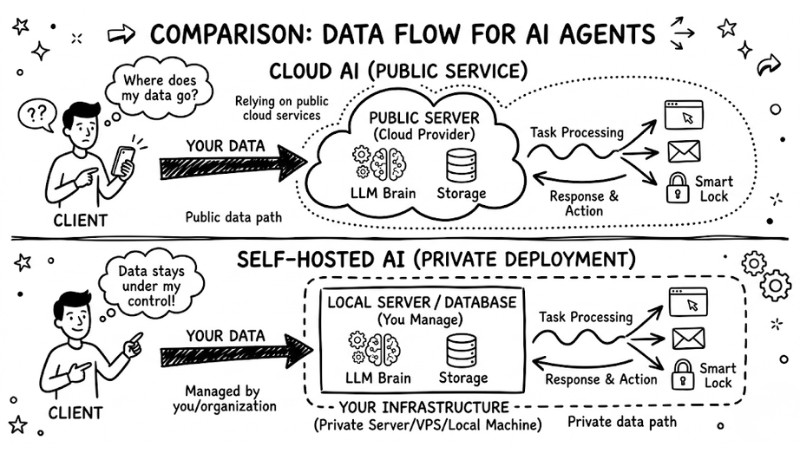
Comparing data flow between Cloud AI and Self-hosted AI
Why choose a Self-hosted AI Agent over Cloud solutions?
Using Cloud services via web interfaces like ChatGPT or Claude can pose risks to data privacy and limit deep integration with internal systems.
- Security and Privacy: With a Cloud model, data is sent and processed on the provider's infrastructure, whereas a self-hosted system keeps data within private infrastructure controlled by you, reducing the risk of leaks or unauthorized access.
- Local System Access: Self-hosted AI Agents can directly access the filesystem and authorized internal services, supporting server administration automation, internal file processing, and integration with existing applications in a controlled environment.
- Customization: You can choose and combine various language models, including open-source models like Llama 3 or commercial models like GPT-4 via APIs, customizing configurations and processing pipelines according to your needs.
- Operating Costs: Instead of paying fixed fees per user or via SaaS packages, the self-hosting model focuses on infrastructure costs like a VPS or dedicated server, which is often more cost-effective for long-term scaling.
How a Self-hosted AI Agent System Works
The operational process of a self-hosted AI Agent typically includes the following steps:
- Input Reception: The Agent receives requests from integrated channels such as Telegram, Discord, Slack, or a command-line interface depending on the deployment configuration.
- Intent Analysis: An LLM is used to understand the goal and the type of task the user wishes to perform within the current context.
- Context Retrieval: The system queries memory, such as a vector database or other context repositories, to retrieve interaction history and relevant information.
- Planning and Tool Selection: The Agent decides the sequence of execution steps and selects appropriate tools such as file scanning, API calling, or script running based on intent and context.
- Execution and Feedback: The Agent executes selected actions, synthesizes intermediate results (if any), and returns the final result to the user via the original interaction channel.
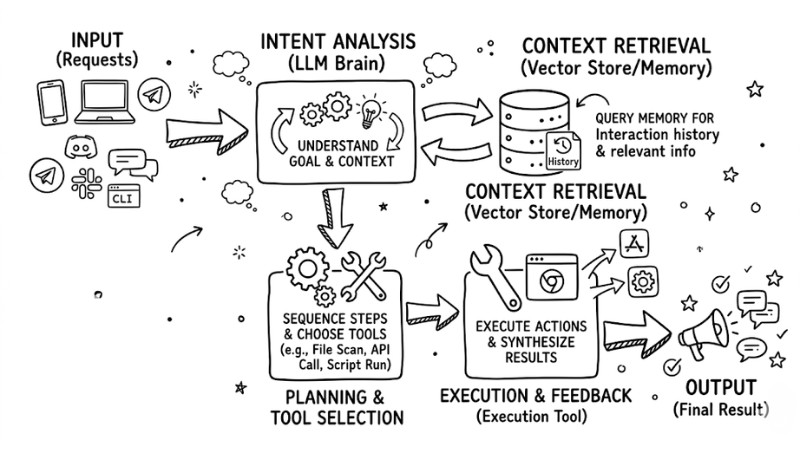
The operating procedure of the self-storing AI Agent system
Top 3 Popular Platforms for AI Agent Deployment
Below are three typical platforms for deploying self-hosted AI Agents with a brief comparison table:
| Criteria | OpenClaw | n8n | Moltworker |
|---|---|---|---|
| Description | Self-hosted AI Agent framework deployed on private servers or VPS. | Workflow automation platform with AI Agent nodes and many service integrations. | Personal AI Agent running on Cloudflare Workers and the edge. |
| Strengths | Supports reading and processing internal files; easy to configure for 24/7 runs. | Low-code drag-and-drop interface; broad integration ecosystem with many services. | Optimized for edge deployment; minimal server management; leverages Cloudflare. |
| Best For | Individuals or small groups prioritizing data and local environment control. | Automation enthusiasts, system engineers, and ops teams coordinating services. | Tech-savvy users wanting to deploy personal agents quickly on edge infrastructure. |
3-Step Roadmap for Self-hosted AI Agent Deployment
Deploying with Docker standardizes the environment and reduces OS-specific configuration risks when running an AI Agent on a VPS or personal computer.
- Prepare the Environment: Install Docker and Docker Compose on your VPS or PC, ensuring the Docker daemon is operating stably before launching services.
- Configure Files: Create a
docker-compose.yamlfile to define the AI Agent service and necessary environment variables.
version: '3.8'
services:
  ai-agent:
    image: openclaw/agent:latest
    environment:
      - LLM_API_KEY=sk-your-key
      - STORAGE_PATH=/data
    volumes:
      - ./data:/data
    restart: always
- Launch: In the directory containing the configuration file, run the command
docker-compose up -dto build the container and start operating the AI Agent in the background.
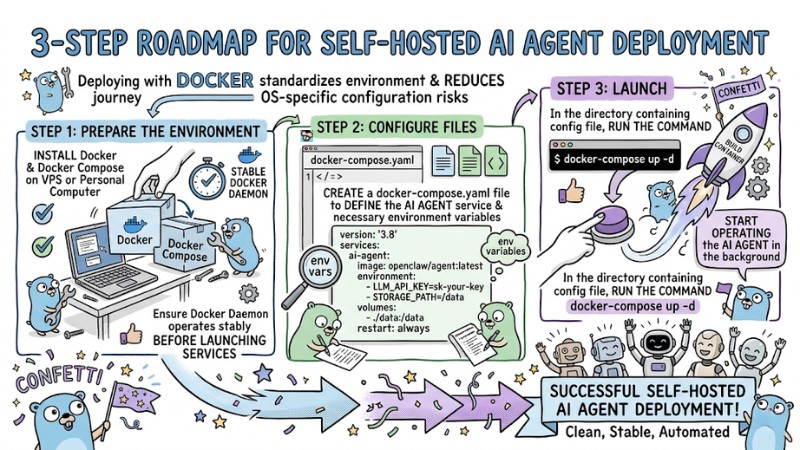
Self-hosted AI Agent Deployment Process
Important Security Considerations for AI Agent Operation
When deploying a self-hosted AI Agent, you should apply basic security principles to limit data leakage risks and system access abuse:
- Principle of Least Privilege: Do not run the Agent with root privileges; only grant read or write permissions for directories and resources strictly necessary for execution.
- Protect the .env File: Do not commit files containing API keys or passwords to public source code repositories; use secret manager mechanisms or inject environment variables directly on the deployment server.
- Use a Sandbox: Execute commands and code generated by the Agent in a containerized or isolated sandbox environment with resource limits and restricted access to minimize impact in case of errors or unintended behaviors.
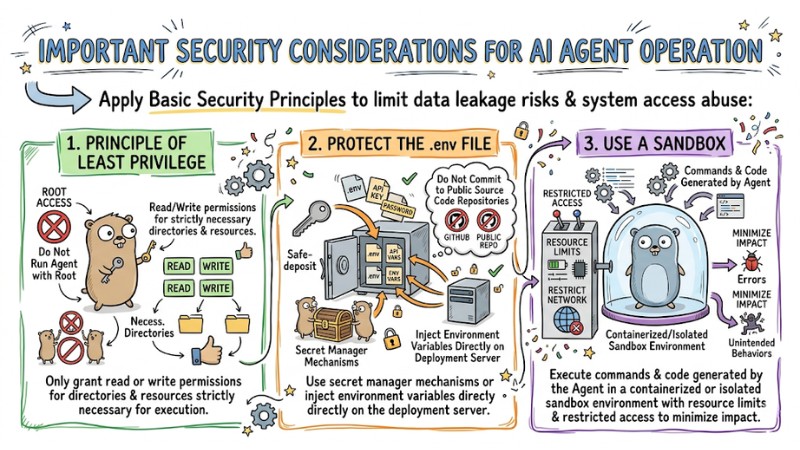
Some important notes when operating AI Agents
FAQ
Do I need a powerful Graphics Processing Unit (GPU)?
If you use APIs from providers like OpenAI or Anthropic, you do not need a GPU; the machine only acts to call the API and receive results. If you wish to run a Local LLM, you should use a GPU with at least about 8GB of VRAM to stably operate compressed 7B-8B models.
What is the difference between n8n and OpenClaw?
n8n is a workflow automation platform, strong at designing multi-step processes via flowcharts and integrating hundreds of services. OpenClaw is an AI Agent framework focused on conversation, reasoning, and task execution from natural language on a private server.
Do I need a GPU to run a self-hosted AI agent?
Not mandatory; you can use a CPU combined with cloud LLM APIs, as long as you configure stable infrastructure for the agent to run continuously. A GPU primarily helps accelerate performance when you want to run large models locally, especially those with many billions of parameters.
Can I run an AI agent on a VPS?
Yes, a VPS is a popular choice for running an AI Agent 24/7 because it is easy to configure, has a static IP, and operates independently of a personal machine. You can deploy the agent on a VPS using Docker or similar services to stay proactive regarding resources, security, and scalability.
Read more:
- How AI Agents work: Autonomy and Functional Mechanisms
- When to Use an AI Agent? 7 Signs You Need Automation
- What is Agent Swarm? How Agent Swarm Automates Workflows
Self-hosted AI Agents provide high levels of autonomy regarding data security, cost, and deep integration with existing infrastructure, suitable for both individuals and organizations wanting to master AI technology. Based on the Docker deployment steps, choosing the right platform, and adhering to security principles, you can step-by-step build a stable self-hosted AI Agent system that meets your automation needs.